
Scalpel Tags
Scalpel Tags: analytics and marketing tag debugger
Runs entirely in your browser. No tracking, no accounts, and nothing is sent to a server.
Coming to the Chrome Web Store
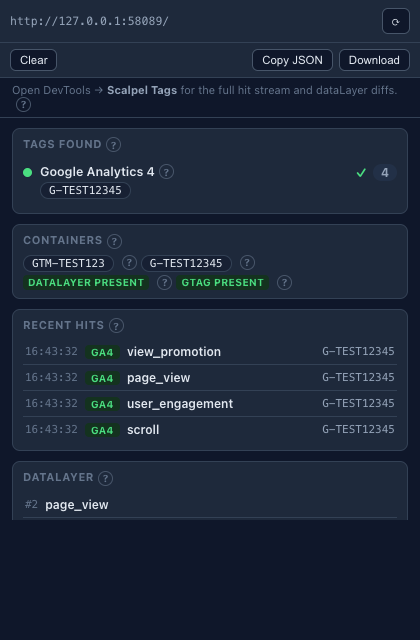
Scalpel Tags decodes the analytics and marketing tags a page fires, in real time, into readable parameter tables, next to a live dataLayer timeline with diffs. It only reads that traffic, never blocking or changing it, and keeps everything on your machine.
A closer look
What it does
- Multi-vendor hit decodingDecode GTM, GA4, Google Ads, and Meta Pixel hits side by side, with no account, companion site, or remote debug session.
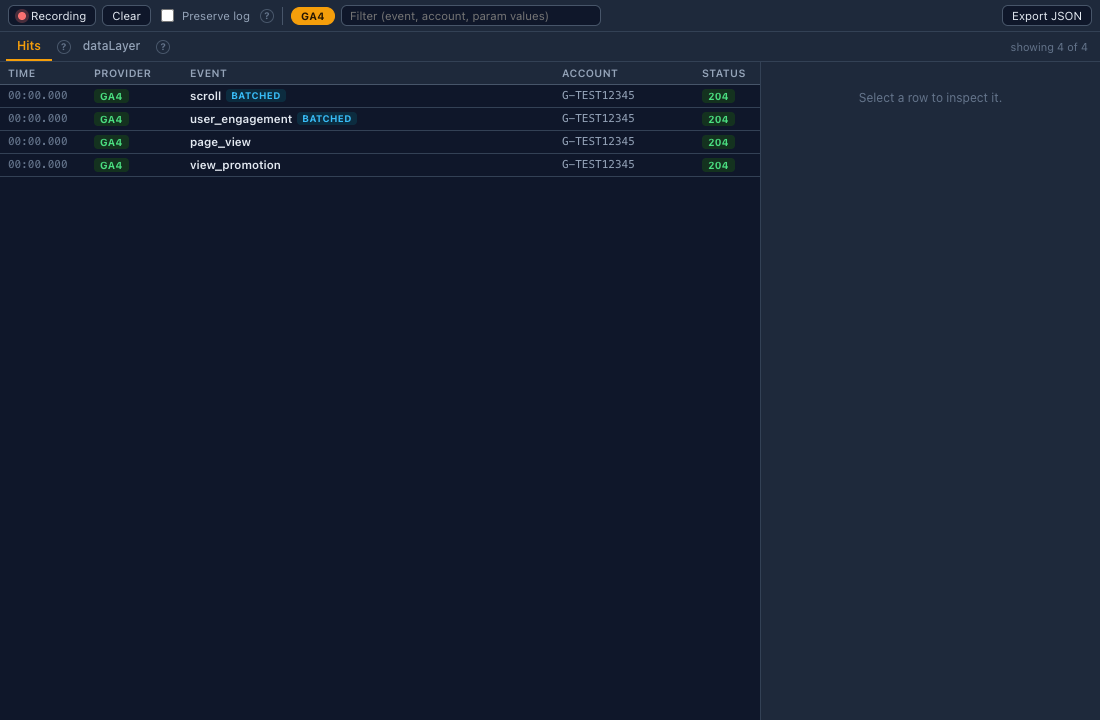
- GA4 parameter decodingGA4 collect requests are expanded into named groups: measurement id, client and session ids, event name, consent state, and event and user parameters. Batched hits are split into one row per event.
- dataLayer timeline with diffsEvery dataLayer push is captured in order with an added, changed, and removed diff against the previous state, plus an accumulated-state view. Early pushes are replayed and flagged.
- Popup, DevTools panel, and side panelA compact popup gives the at-a-glance summary. A DevTools panel adds the full hit stream with filters, record and pause, preserve-log, and grouped or raw parameter views, and a docked side panel follows the active tab while you browse. Mute a vendor to hide its hits across all three.
- Read-only and privateThe extension only reads page traffic. It never blocks or changes a request, makes no requests of its own, and clears captured data when you close the browser.
- Exports, shortcuts, and helpExport the hit log and dataLayer timeline as JSON, or the captured hits as a HAR 1.2 file. A right-click menu inspects tags or toggles preserve-log, keyboard shortcuts drive the panel, and a ? on each concept links to the glossary.
Permissions, explained
Chrome shows these permissions when you install the extension. Here's what each one is for and why it's the least this tool needs.
webRequestObserves, read only, the requests the page makes so it can decode tag hits. It never blocks or modifies traffic.tabsAttributes observed hits to the tab that made them and reads the active tab's URL for the popup header.storagePersists the current tab's captured hits and dataLayer events to session storage so they survive a service-worker restart.sidePanelOpens the hit stream as a docked Chrome side panel that follows the active tab.contextMenusAdds the extension's own right-click items to inspect tags or toggle preserve-log. It only adds menu items and reads no page.host_permissions: <all_urls>Tag endpoints can be on any origin, so the hosts to observe cannot be listed in advance.
Frequently asked questions
How is this different from Google Tag Assistant?
Tag Assistant is Google-only and routes debugging through a hosted session. Scalpel Tags decodes GTM, GA4, Google Ads, and Meta Pixel side by side in your browser, with no account, companion site, or remote debug handshake.
Does it change or block any requests?
No. It observes page traffic read only. It never blocks or modifies a request and makes no network requests of its own.
Where does the captured data go?
It stays in memory and session storage on your device and clears when you close the browser. There's no analytics, tracking, or data collection.
What is the dataLayer timeline?
A record of every dataLayer push in order, with an added, changed, and removed diff against the previous state and an accumulated-state view. Pushes that happened before the extension attached are replayed and flagged.
Is it free?
Yes. Scalpel Tags is free, with no account required.
Learn the concepts
Plain-language definitions of the SEO, analytics, and web terms behind this tool.
More Scalpel extensions
 Scalpel SEO On-page SEO audit and inspector.
 Scalpel Stack Technology detector.
 Scalpel Redirects Redirect chain inspector.
 Scalpel Tab Suspender Tab suspender and memory saver.
 Scalpel Tables Table extractor.
 Scalpel Links Link extractor.
 Scalpel Images Image extractor.
 Scalpel Color Color toolkit.
 Scalpel Manage Tabs Tab search, cleanup, and sessions.
 Scalpel Ads Blocker Ad and tracker blocker.