
Scalpel SEO
Scalpel SEO: on-page audit and inspector
Runs entirely in your browser. No tracking, no accounts, and nothing is sent to a server.
Coming to the Chrome Web Store
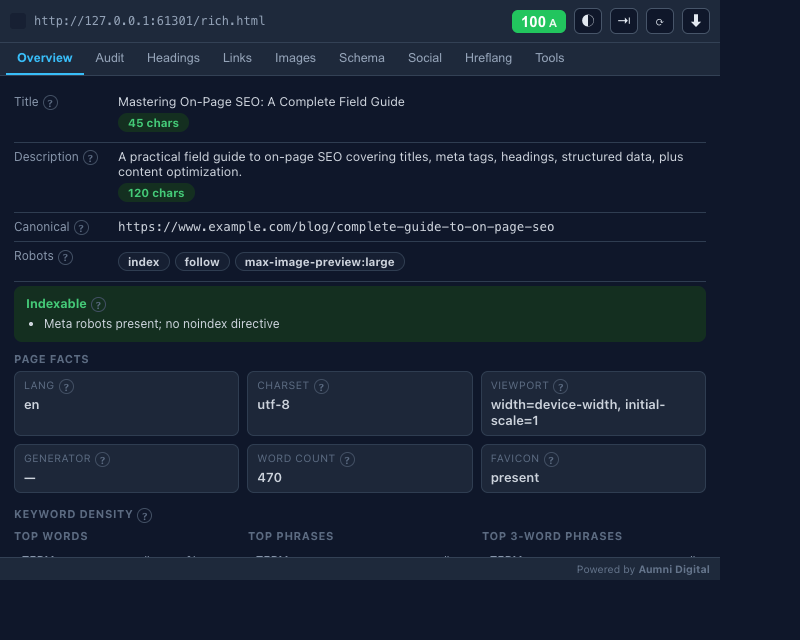
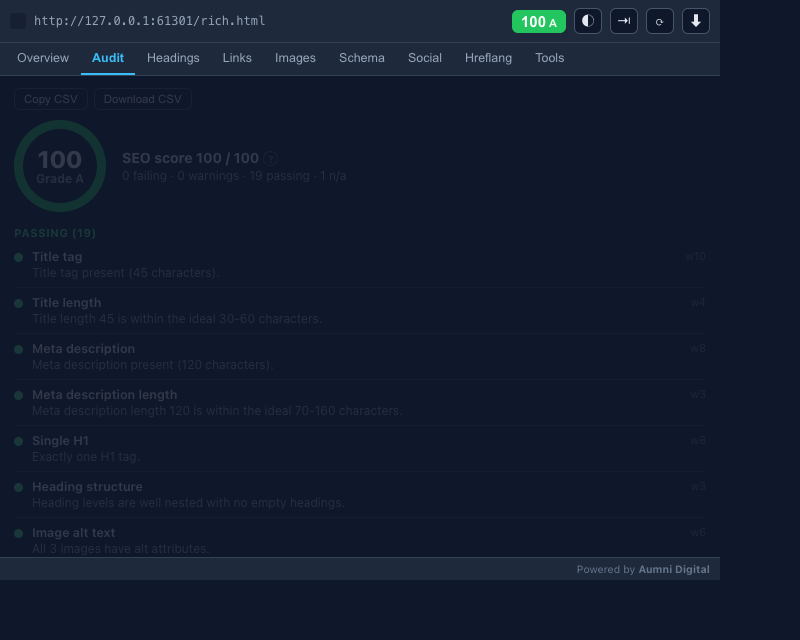
Scalpel SEO audits the page you're on across 20 weighted checks, then shows the score, previews, and issues in a popup or a docked side panel. The analysis runs in your browser, and you can export the full report.
A closer look
What it does
- Weighted audit scoreA 0 to 100 score with an A to F grade across 20 checks: title, meta description, headings, images, structured data, canonical, robots, Open Graph, Twitter cards, hreflang, content volume, and mixed content.
- SERP and social previewsA pixel-accurate Google search preview alongside Open Graph and X (Twitter) card previews, so you see the page the way search and social will render it.
- Structured data checksJSON-LD, microdata, and RDFa detection with completeness checks against Google rich-results requirements, parse-error reporting, and quick links to the validators.
- Hreflang live checksValidate alternate language links, flag duplicates and a missing x-default, then fetch each alternate to confirm its status code and reciprocal linking.
- Links, headings, and imagesA heading hierarchy with structural issues, link classification by type with on-page highlighting, and an image inventory with an alt-text audit.
- Exports, side panel, and shortcutsExport the full audit as JSON, a Markdown report, or per-section CSV, and dock the analyser as a Chrome side panel while you browse. Right-click shortcuts jump to robots.txt, sitemap.xml, PageSpeed Insights, the Rich Results Test, and the Wayback Machine, each one toggleable, and a ? on every check links to a plain explanation in the glossary.
Permissions, explained
Chrome shows these permissions when you install the extension. Here's what each one is for and why it's the least this tool needs.
activeTabReads the active tab so it can extract on-page SEO data when you click the toolbar icon.scriptingInjects the extraction and highlighting scripts into the page.clipboardWriteCopies audit results and exports to your clipboard.storageStores your theme preference (Auto, Light, Dark) locally.contextMenusAdds quick-access context menu items for analysis and SEO tools.sidePanelOpens the analyser as a docked Chrome side panel.declarativeNetRequestRewrites the User-Agent header for the current tab only while Googlebot mode is on. It's session-scoped and doesn't persist.host_permissions: <all_urls>Lets it audit any page you open and run the optional header and hreflang checks on any domain. Analysis stays on your machine.
Frequently asked questions
Does Scalpel SEO send my pages to a server?
No. The audit runs in your browser. Page content is only fetched when you click an optional button, such as the HTTP header check or the hreflang live check, and those requests go to the site you're already inspecting. There's no analytics or tracking.
What does the SEO score measure?
A weighted 0 to 100 score with an A to F grade across 20 on-page checks, including title, meta description, headings, images, structured data, canonical, robots directives, Open Graph, Twitter cards, hreflang, content volume, and mixed content.
Can I export the results?
Yes. Export the full audit as JSON, a Markdown report, or per-section CSV for links, images, headings, hreflang, and the audit checks, then copy or download it.
Why does it ask for access to all sites?
So it can audit whichever page you open it on and run the optional header and hreflang checks against any domain. The target sites can't be known in advance, and analysis stays on your machine.
How much does it cost?
Scalpel SEO is free, with no account and no paywalled features.
Learn the concepts
Plain-language definitions of the SEO, analytics, and web terms behind this tool.
- Anchor link
- Canonical Tag: How to Tell Google Which URL Is the Original
- Canonical URL
- Charset Declaration: Why UTF-8 Belongs at the Top of Every Page
- Empty Alt Text (alt="") for Decorative Images
- External Links
- Favicon: The Small Icon With a Small but Real SEO Role
- Generator Meta Tag: What It Reveals About a Site's Platform
- Heading Structure (H1-H6) and SEO
- Hreflang Tags for International SEO
- HTML lang Attribute: Telling Search Engines and Browsers Your Page's Language
- Image Count
More Scalpel extensions
 Scalpel Tags Analytics tag debugger.
 Scalpel Stack Technology detector.
 Scalpel Redirects Redirect chain inspector.
 Scalpel Tab Suspender Tab suspender and memory saver.
 Scalpel Tables Table extractor.
 Scalpel Links Link extractor.
 Scalpel Images Image extractor.
 Scalpel Color Color toolkit.
 Scalpel Manage Tabs Tab search, cleanup, and sessions.
 Scalpel Ads Blocker Ad and tracker blocker.