
Scalpel Redirects
Scalpel Redirects: redirect path and header inspector
Runs entirely in your browser. No tracking, no accounts, and nothing is sent to a server.
Coming to the Chrome Web Store
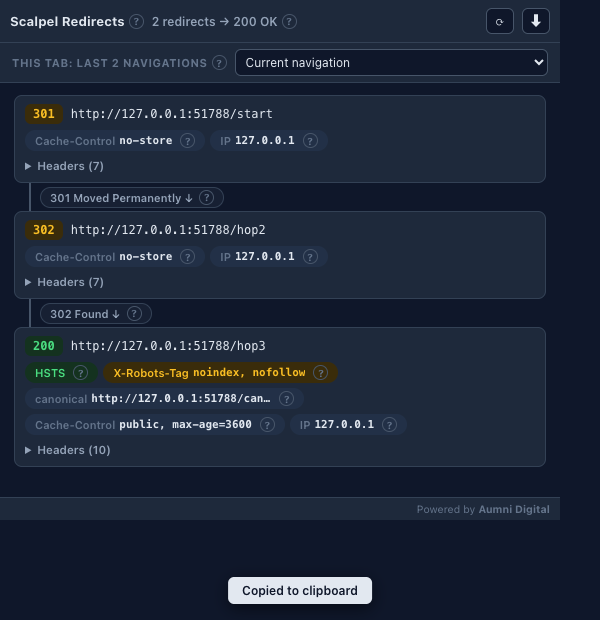
Scalpel Redirects records the complete redirect chain your browser actually followed, every hop with its status and full response headers, plus meta and JavaScript redirects. It observes navigation passively and makes no requests of its own.
A closer look
What it does
- The real chain, not a re-fetchIt records the navigation your browser actually made, so the chain reflects your cookies, session, and location, not a fresh server request.
- Full headers per hopEvery response header of every hop, in original order, with per-hop hint chips for HSTS, X-Robots-Tag, canonical header, Cache-Control, server, resolved IP, and cache state.
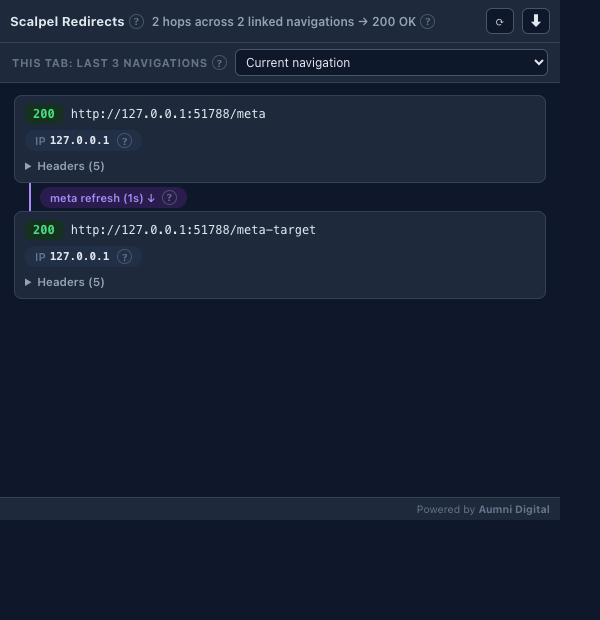
- Meta and JavaScript redirectsMeta-refresh and JavaScript redirects are detected, labelled distinctly, and linked to the server chain that preceded them.
- Per-tab historyThe last 20 navigations per tab are kept and browsable, so a client-side redirect no longer erases the chain before you can read it.
- Verdict, wasted hops, and fix snippetsA plain verdict line for each chain, with hints where a hop is wasted, such as a 301 to 301 that should collapse or an http to https to www triple hop. For the shapes it recognises it writes the fix for you: nginx, Apache, and Cloudflare rules with the real final URL filled in.
- Side panel, curl, and exportsThe toolbar badge flags each tab's outcome before you click. Dock the inspector in a side panel for reload loops, read a per-hop timing waterfall, and copy any hop or the whole chain as a curl command. Export as JSON, Markdown, CSV, or HAR, with a right-click menu and a ? on each concept linking to the glossary.
Permissions, explained
Chrome shows these permissions when you install the extension. Here's what each one is for and why it's the least this tool needs.
webRequestObserves, never blocks or modifies, main-frame requests to record each redirect hop with its status, headers, IP, and cache flag.webNavigationDetects client-side meta and JavaScript redirects so they can be linked to the preceding server chain.storageKeeps recorded chains alive across service-worker restarts in session storage. It's memory-only and clears when the browser closes.sidePanelOpens the redirect inspector as a docked Chrome side panel that survives reloads.contextMenusAdds the extension's own right-click items to trace a link or open the side panel. It only adds menu items and reads no page.host_permissions: <all_urls>Redirect observation must work on whatever site you audit, so the host cannot be listed in advance. It is observational only.
Frequently asked questions
How is this different from an online redirect checker?
An online checker re-fetches the URL from a server and can miss redirects that depend on your cookies, session, user agent, or location. Scalpel Redirects records the navigation your browser actually made, so the chain you see is the one that happened.
Will I lose the chain if a client-side redirect fires?
No. It keeps the last 20 navigations per tab in a history strip and links client-side redirect chains to the server chain before them, so the full path stays visible.
Does it make any requests of its own?
No. It watches navigation passively, never blocks or modifies a request, and stores what it records in session-only storage that clears when you close the browser.
What can it show me per hop?
Every response header in original order, plus hint chips for HSTS, X-Robots-Tag, canonical header, Cache-Control, server, resolved IP, and whether the hop was served from cache.
Is it free?
Yes. Scalpel Redirects is free, with no account.
Learn the concepts
Plain-language definitions of the SEO, analytics, and web terms behind this tool.
- 301 redirect
- 302 redirect
- 303 redirect
- 307 redirect
- 308 redirect
- Cache-Control Header
- Canonical Link Header
- Follow Redirects with curl - Replay a Chain from the Shell
- HAR File - Share a Redirect Chain in DevTools Format
- HSTS Header: How Strict-Transport-Security Eliminates Redirect Hops
- JavaScript Redirect
- Meta Refresh Redirect: How It Works and Why Server Redirects Beat It
More Scalpel extensions
 Scalpel SEO On-page SEO audit and inspector.
 Scalpel Tags Analytics tag debugger.
 Scalpel Stack Technology detector.
 Scalpel Tab Suspender Tab suspender and memory saver.
 Scalpel Tables Table extractor.
 Scalpel Links Link extractor.
 Scalpel Images Image extractor.
 Scalpel Color Color toolkit.
 Scalpel Manage Tabs Tab search, cleanup, and sessions.
 Scalpel Ads Blocker Ad and tracker blocker.