
Scalpel Links
Scalpel Links: link extractor
Runs entirely in your browser. No tracking, no accounts, and nothing is sent to a server.
Coming to the Chrome Web Store
Scalpel Links extracts every hyperlink on a page, or only the links inside a region you drag-select, then filters, dedupes, sorts, and exports them. Anchor text and rel attributes are preserved.
A closer look
What it does
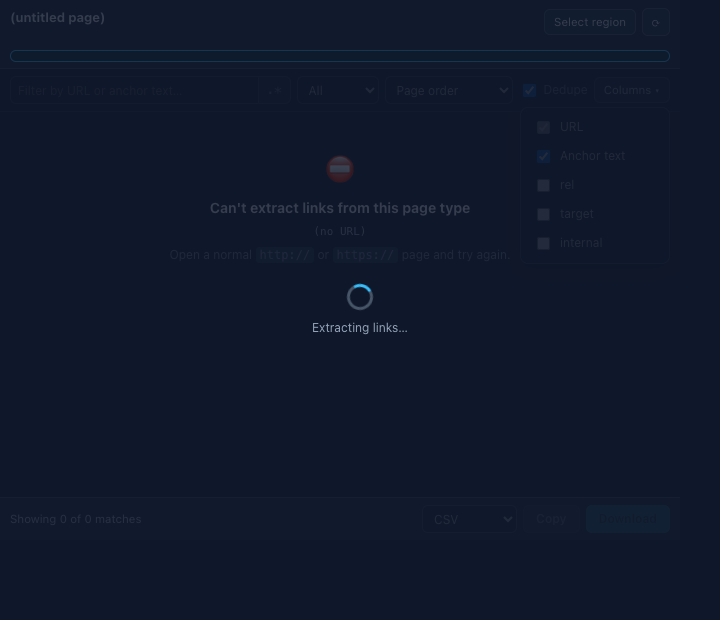
- Click to extractGrab every hyperlink on the page, with a total count, an internal, external, and unique breakdown, and a searchable table that keeps anchor text and rel attributes. A right-click menu extracts the page, or opens its sitemap.xml or robots.txt.
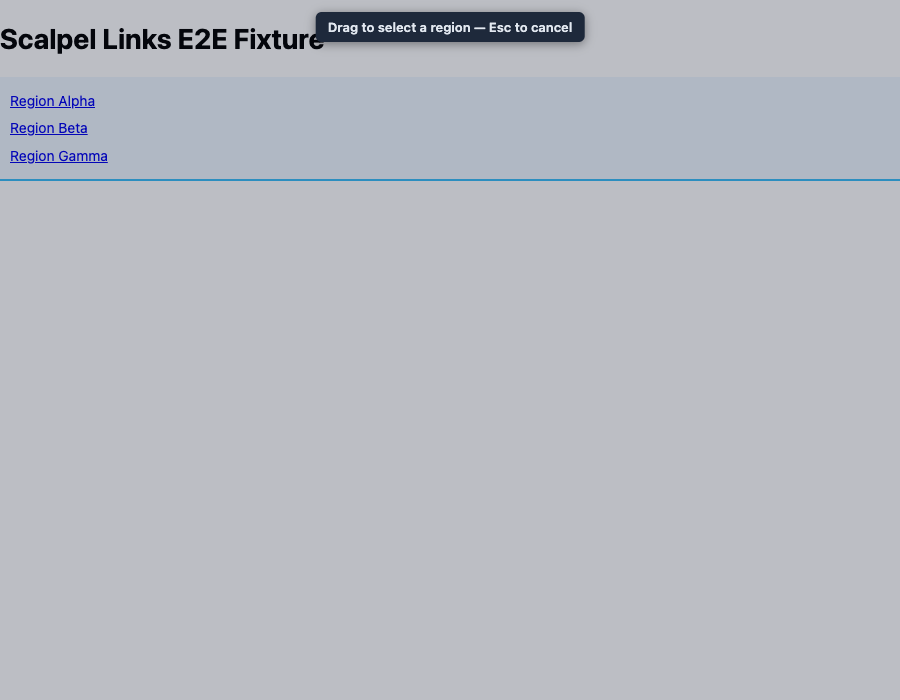
- Drag-select a regionOverlay a rectangle and capture only the links inside it. The selection survives popup close and reopen, with a badge on the tab.
- Filter and scopeLive substring or regular-expression filter with a match count, plus scope filters for internal, external, or other links such as mailto, tel, and fragments.
- Dedupe, sort, and column pickerRemove duplicate URLs, sort by document order or alphabetically, and choose which columns appear in the export.
- Six export formatsExport as CSV, TSV, plain text, Markdown, JSON, or a sitemaps.org XML urlset, by copy or download with a suggested filename.
- Checks, flags, and privacyAn opt-in Check links button HEAD-requests each match and badges its status (200, 3xx, 4xx, 5xx), asking for host access only at click time. Rows flag weak anchor text and a missing rel=noopener, and a Highlight toggle outlines links on the page by type. Extraction itself runs locally, session storage clears when you close the tab, and a ? on each control links to the glossary.
Permissions, explained
Chrome shows these permissions when you install the extension. Here's what each one is for and why it's the least this tool needs.
This extension requests no access to all sites. It can only read a page after you click its icon there.
activeTabReads the active tab to extract links when you click the icon or start a region selection.scriptingInjects the link extractor and region-select overlay into the page.clipboardWriteCopies export results to your clipboard.downloadsSaves exports to a file with a suggested filename.storageHolds region-capture handoff and popup preferences in session storage, cleared on browser restart.contextMenusAdds right-click items to extract the page or open its sitemap.xml or robots.txt. It only adds menu items.
Frequently asked questions
Can I extract only some of the links on a page?
Yes. Start a region selection, drag a rectangle, and only the links inside it are captured. You can also filter by substring or regular expression and by scope.
What formats can I export?
CSV, TSV, plain text, Markdown, JSON, or a sitemaps.org XML urlset, by copy or download, with a column picker to choose which fields appear.
Does it keep anchor text?
Yes. Each link keeps its anchor text and its rel and target attributes, and you can dedupe and sort the results.
Does it send anything to a server?
Extraction runs locally and nothing is sent anywhere by default. The one exception is the opt-in Check links button, which HEAD-requests each link to read its status; it asks for host access at that moment and sends no cookies or page content. Session storage clears when you close the tab.
Is it free?
Yes. Scalpel Links is free, with no account.
Learn the concepts
Plain-language definitions of the SEO, analytics, and web terms behind this tool.
More Scalpel extensions
 Scalpel SEO On-page SEO audit and inspector.
 Scalpel Tags Analytics tag debugger.
 Scalpel Stack Technology detector.
 Scalpel Redirects Redirect chain inspector.
 Scalpel Tab Suspender Tab suspender and memory saver.
 Scalpel Tables Table extractor.
 Scalpel Images Image extractor.
 Scalpel Color Color toolkit.
 Scalpel Manage Tabs Tab search, cleanup, and sessions.
 Scalpel Ads Blocker Ad and tracker blocker.