
Scalpel Tables
Scalpel Tables: table extractor
Runs entirely in your browser. No tracking, no accounts, and nothing is sent to a server.
Coming to the Chrome Web Store
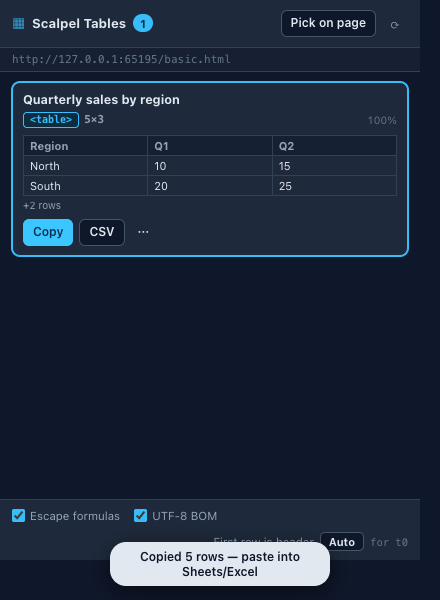
Scalpel Tables detects every table and table-like grid on a page, then copies it to your clipboard or downloads it as CSV. Merged cells are expanded correctly, so the result pastes cleanly into a spreadsheet.
A closer look
What it does
- Detects every table formatNative HTML tables, ARIA role=table and role=grid widgets, CSS grid and table layouts, and repeated-structure div tables.
- Rich clipboard copyOne copy writes both plain text and styled HTML, so rows, columns, and multi-line cells paste cleanly into Sheets, Excel, Word, or Numbers.
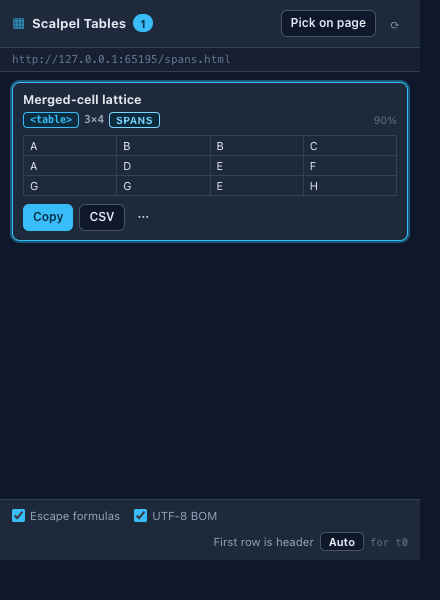
- Correct colspan and rowspanMerged cells are expanded into a rectangular grid, matching what you expect when pasting into a spreadsheet.
- CSV and XLSX, injection-safeDownload RFC 4180 CSV in UTF-8 or a native .xlsx workbook, with no library bundled. Cells starting with =, +, -, or @ are escaped by default so nothing runs a formula in Excel or Sheets.
- In-page picker and right-clickHover any table on the page and click to select it directly from the overlay, with no table numbers to track. A right-click menu can capture every table or copy the one under your cursor without opening the popup.
- Merge, transpose, and type chipsTick several tables and export them as one stacked CSV, one workbook with a sheet per table, or a single rich copy. Transpose any table, and read a column-type chip (number, currency, date, and the rest) inferred from its values. Everything runs in your browser with no account, and a ? on each control links to the glossary.
Permissions, explained
Chrome shows these permissions when you install the extension. Here's what each one is for and why it's the least this tool needs.
This extension requests no access to all sites. It can only read a page after you click its icon there.
activeTabReads the page you are viewing to detect tables when you click the toolbar icon.scriptingInjects the detection and picker scripts into the page.clipboardWriteCopies table data to your clipboard.downloadsSaves tables as CSV or XLSX files.contextMenusAdds right-click items to capture tables or copy the one under your cursor. It only adds menu items.storageStores your context-menu toggles and popup preferences locally on your device.
Frequently asked questions
Will merged cells break when I paste into a spreadsheet?
No. Colspan and rowspan are expanded into a rectangular grid, so rows and columns line up when you paste into Sheets, Excel, Word, or Numbers.
What can it extract besides normal tables?
Native HTML tables, ARIA role=table and role=grid widgets, CSS grid and table layouts, and repeated-structure div tables.
How does it protect against CSV formula injection?
Cells starting with =, +, -, or @ are escaped by default, so a file won't run a formula when opened in Excel or Sheets. You can turn escaping off for programmatic use.
Does my table data leave my browser?
No. Detection, expansion, and export all run locally. No page content, URLs, or table data are sent to a server.
Is it free?
Yes, with unlimited rows and columns and no account.
Learn the concepts
Plain-language definitions of the SEO, analytics, and web terms behind this tool.
- Colspan and Rowspan: How Merged Table Cells Are Exported
- Column Data Type Inference: Guessing What Each Column Holds
- Copy a Web Table into Google Sheets Without Losing Columns
- CSV File Format: What It Is and How Quoting Works
- CSV Injection: Why a Cell Starting with = Is Dangerous
- Markdown Tables - The Pipe Syntax and Its Limits
- Merge Several Web Tables into One CSV or Excel Workbook
- Nested Tables - How a Table Inside a Cell Is Handled
- Pick a Table on the Page - Click to Capture Exactly One
- Table Detection Confidence: What the Percentage Means
- Table Extraction Limits: Why a Big Table Gets Truncated
- Table Header Row: Telling Headings from Data
More Scalpel extensions
 Scalpel SEO On-page SEO audit and inspector.
 Scalpel Tags Analytics tag debugger.
 Scalpel Stack Technology detector.
 Scalpel Redirects Redirect chain inspector.
 Scalpel Tab Suspender Tab suspender and memory saver.
 Scalpel Links Link extractor.
 Scalpel Images Image extractor.
 Scalpel Color Color toolkit.
 Scalpel Manage Tabs Tab search, cleanup, and sessions.
 Scalpel Ads Blocker Ad and tracker blocker.