
Scalpel Ads Blocker
Scalpel Ads Blocker: declarativeNetRequest ad and tracker blocking
Runs entirely in your browser. No tracking, no accounts, and nothing is sent to a server.
Coming to the Chrome Web Store
Scalpel Ads Blocker blocks ad and tracker requests with Chrome's declarativeNetRequest API and bundled EasyList and EasyPrivacy rules, so the blocking runs inside the browser engine rather than a script watching your traffic. It keeps a per-site allowlist, a global pause, and per-page and all-time blocked counts, and collects no data. Because Chrome enforces the rules, it asks for no access to the sites you visit.
A closer look
What it does
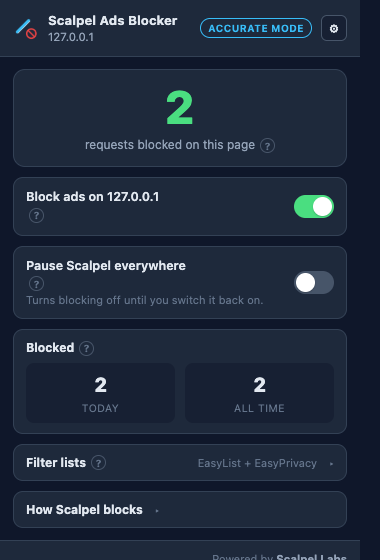
- Blocking inside Chrome's engineRules run through declarativeNetRequest, so Chrome cancels ad and tracker requests itself and the extension never sees them. That's quicker and more private than filtering traffic in JavaScript.
- EasyList and EasyPrivacy, bundledShips with EasyList and EasyPrivacy converted to Chrome rules at build time and bundled in, so there's no live rule server to fetch from and blocking works offline. The filter data is credited to the EasyList authors under GPL.
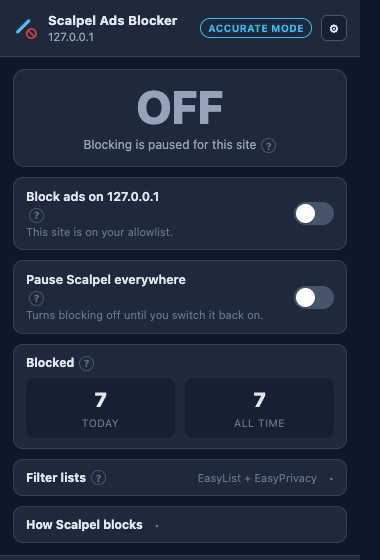
- Per-site allowlistTurn blocking off for a site you want to support in one click. The allowlist is stored locally as a dynamic rule, easy to review or change.
- Global pauseSwitch all blocking off for the browsing session without touching your lists, then switch it back on when you're done.
- Blocked counts and statsSee how many requests were blocked on the current page, shown on the toolbar badge and in the popup, plus a today and all-time tally kept in local storage.
- No data collection, no remote codeNo analytics, no telemetry, and no account. Rules are declared statically and shipped in the extension, so there's no remote code and nothing to phone home to. A right-click menu and a ? on each control link to the glossary.
Permissions, explained
Chrome shows these permissions when you install the extension. Here's what each one is for and why it's the least this tool needs.
This extension requests no access to all sites. It can only read a page after you click its icon there.
declarativeNetRequestSupplies Chrome with the bundled blocking rules. Chrome matches requests against them itself, so your traffic never passes through the extension. This is how Manifest V3 blockers work.storageStores your per-site allowlist and the today and all-time blocked counts locally on your device. Nothing is transmitted.activeTabWhen you open the popup, it reads the current tab to count how many requests Chrome blocked on that page. It grants access only to the tab you're viewing, only when you click the icon.contextMenusAdds right-click items to allowlist the current site or open the stats. It only adds menu items and processes nothing new.
Frequently asked questions
How does declarativeNetRequest help privacy?
You declare the rules and Chrome enforces them, so the extension never sees the individual requests. There's no traffic log for it to leak or sell, which is the opposite of blockers that read every request in JavaScript.
Which filter lists does it use?
EasyList and EasyPrivacy, the open lists most blockers build on. They're converted to Chrome rules at build time and bundled in, not fetched from a live server, and the exact upstream snapshot is recorded in the source.
Why doesn't a blocked advert leave a clean gap?
Blocking happens at the network layer: it stops the request that fetches an advert, which saves data, but it can't hide an empty box the advert would have filled. That's cosmetic filtering, a CSS job, and version 1 doesn't do it yet. It's on the roadmap as a separate, clearly-labelled option. Text adverts already written into the page HTML aren't affected either.
Can I allow ads on sites I want to support?
Yes. A per-site allowlist turns blocking off for any site in one click, stored locally so you can review and change it whenever. There's also a global pause for the whole browser.
Does it collect any data?
No. No analytics, no telemetry, no account, and no record of the sites you visit. Blocked counts are kept locally on your device.
Is it free?
Yes. Free, with no pro tier, paywall, or donate wall. It's open source under GPL-3.0.
Learn the concepts
Plain-language definitions of the SEO, analytics, and web terms behind this tool.
- Acceptable Ads, and Why Scalpel Opts Out
- Cosmetic Filtering, and Why V1 Skips It
- declarativeNetRequest, the Manifest V3 Blocking API
- Dynamic Rules, Added While You Browse
- EasyList, the Filter List Behind Most Ad Blockers
- EasyPrivacy, the Tracker List
- How Ad Blockers Work
- Manifest V3 and Content Blocking
- Network-Level Blocking, and Its One Limit
- Pausing, Per Site and Everywhere
- Request Resource Types
- Static Rulesets, the Bundled Rule Files
More Scalpel extensions
 Scalpel SEO On-page SEO audit and inspector.
 Scalpel Tags Analytics tag debugger.
 Scalpel Stack Technology detector.
 Scalpel Redirects Redirect chain inspector.
 Scalpel Tab Suspender Tab suspender and memory saver.
 Scalpel Tables Table extractor.
 Scalpel Links Link extractor.
 Scalpel Images Image extractor.
 Scalpel Color Color toolkit.
 Scalpel Manage Tabs Tab search, cleanup, and sessions.