
Scalpel Images
Scalpel Images: image extractor
Runs entirely in your browser. No tracking, no accounts, and nothing is sent to a server.
Coming to the Chrome Web Store
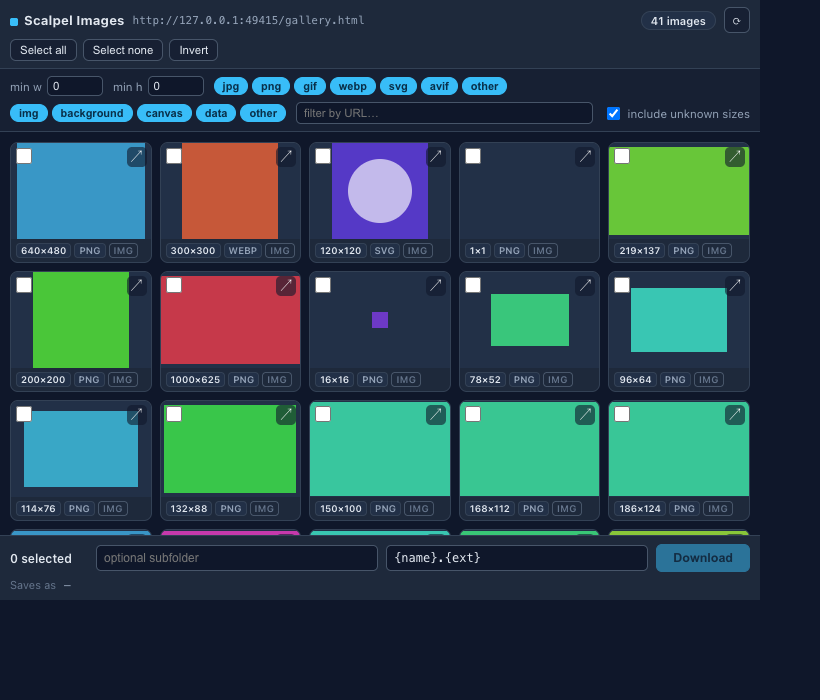
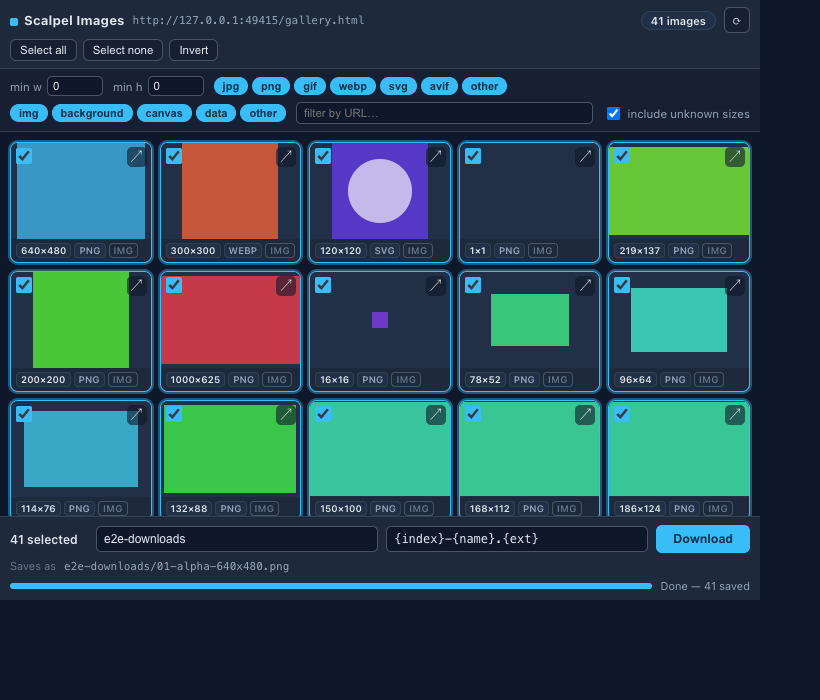
Scalpel Images finds every image on a page, including the hidden ones in lazy-load attributes, srcset, CSS backgrounds, and canvas, then filters, selects, and bulk downloads them with a rename pattern.
A closer look
What it does
- Even lazy-loaded and canvas imagesFinds images from eight sources: img tags, lazy-load attributes, srcset and picture variants, CSS backgrounds, same-origin canvas, preload hints, and Open Graph and Twitter metadata.
- Largest-variant selectionFor responsive images it picks the largest variant from srcset and picture, and it probes unknown-size images so minimum-width filters still work.
- Filter by size, weight, type, or sourceNarrow by minimum width and height, transferred weight in KB, type (jpg, png, gif, webp, svg, avif), discovery source, or URL substring, and hide near-duplicate images. The grid re-renders live.
- Bulk download with patternsSelect the images you want and rename them with free tokens for name, extension, width, height, format, index, host, and date, then organise downloads into subfolders.
- Next-gen advice and right-clickIt flags JPEG, PNG, and GIF images that would be smaller as WebP or AVIF, advisory only, so nothing is re-encoded. A right-click menu grabs a page's images or downloads a single image, and a ? on each control links to the glossary.
- Private by designDiscovery runs locally and Chrome handles the actual downloads. No page content is sent to a server, and there is no account or paywall.
Permissions, explained
Chrome shows these permissions when you install the extension. Here's what each one is for and why it's the least this tool needs.
This extension requests no access to all sites. It can only read a page after you click its icon there.
activeTabReads the active tab to discover images when you click the toolbar icon.scriptingInjects the collector script that finds images in the DOM.downloadsStarts bulk downloads when you click Download.contextMenusAdds right-click items to grab a page's images or download a single image. It only adds menu items.storageStores your context-menu toggles and popup preferences locally on your device.
Frequently asked questions
Does it find lazy-loaded and background images?
Yes. It discovers images from eight sources, including lazy-load attributes, srcset and picture variants, CSS backgrounds, same-origin canvas, preload hints, and Open Graph and Twitter metadata.
Can I rename files during a bulk download?
Yes. Apply a pattern with free tokens for name, extension, width, height, format, index, host, and date, and send the downloads into subfolders.
How do the size filters work on images the page never rendered?
The popup probes unknown-size images in the background, so a minimum width or height filter still applies to them.
Does my page data leave the browser?
No. Discovery runs locally, and Chrome handles the actual file downloads. Nothing is sent to a server, and there's no account or paywall.
Is it free?
Yes. Scalpel Images is free.
Learn the concepts
Plain-language definitions of the SEO, analytics, and web terms behind this tool.
More Scalpel extensions
 Scalpel SEO On-page SEO audit and inspector.
 Scalpel Tags Analytics tag debugger.
 Scalpel Stack Technology detector.
 Scalpel Redirects Redirect chain inspector.
 Scalpel Tab Suspender Tab suspender and memory saver.
 Scalpel Tables Table extractor.
 Scalpel Links Link extractor.
 Scalpel Color Color toolkit.
 Scalpel Manage Tabs Tab search, cleanup, and sessions.
 Scalpel Ads Blocker Ad and tracker blocker.