
Scalpel Stack
Scalpel Stack: technology stack detector
Runs entirely in your browser. No tracking, no accounts, and nothing is sent to a server.
Coming to the Chrome Web Store
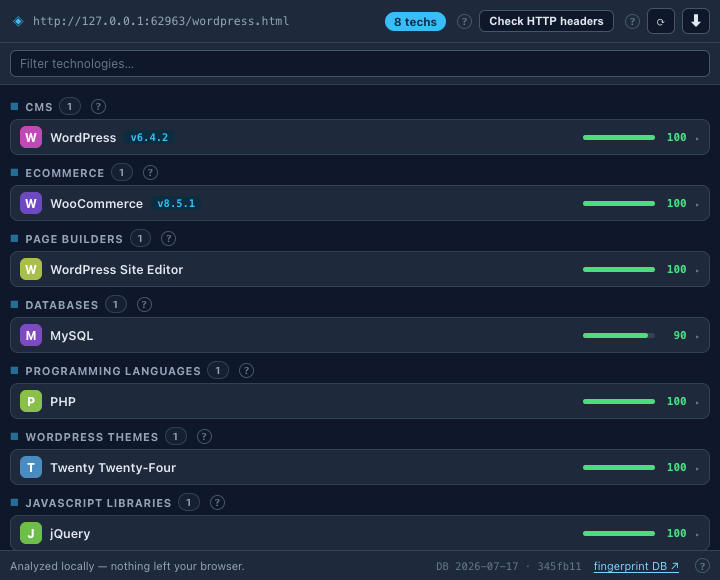
Scalpel Stack identifies the frameworks, CMS, analytics, libraries, and server software behind any page. Every detection is matched locally against a bundled fingerprint database and shows the evidence behind it.
A closer look
What it does
- Local technology detectionAnalyse the live page across nine vectors: HTTP headers, meta tags, script sources, inline scripts, HTML, URL, cookies, JavaScript globals, and DOM selectors. No server sees your page.
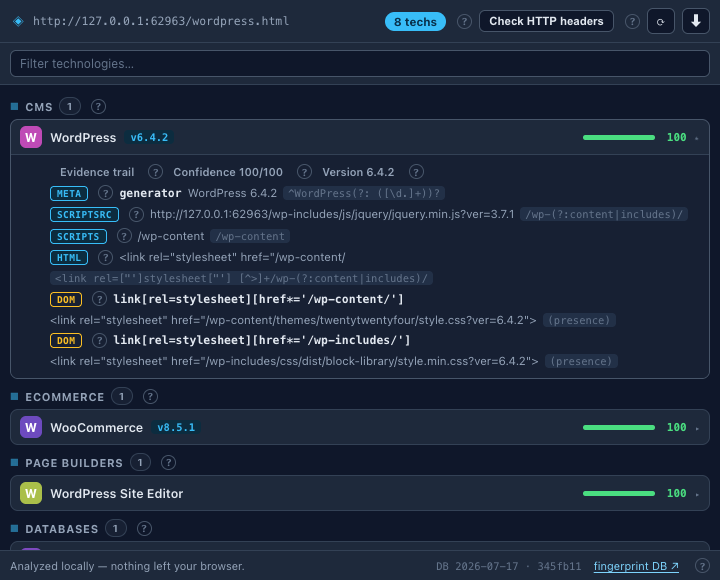
- Evidence trailEvery detection shows why it fired: the vector, the fingerprint pattern, and the matched text. Expand a row to verify it yourself and to see how its confidence was scored, signal by signal.
- Versions and confidenceVersion numbers are pulled from fingerprint capture groups, and each technology carries a confidence score from 0 to 100.
- On-demand header checkServer-side technologies often appear only in response headers. One click fetches the current tab's URL to add header-based detections, and only when you ask.
- No host permissionsIt asks for no host permissions and does no background monitoring, so it can't read a page until you click its icon or a right-click action there. Recent scans stay in memory-only session storage and clear when you close the browser.
- Open database, side panel, and exportsPowered by a version-pinned snapshot of the open webappanalyzer fingerprint database, with a footer badge that flags when the snapshot is getting old. Dock the analysis in Chrome's side panel, narrow it with category chips or a text filter, and export JSON, a Markdown report, or CSV for free. A right-click menu and a ? on each concept link to the glossary.
Permissions, explained
Chrome shows these permissions when you install the extension. Here's what each one is for and why it's the least this tool needs.
This extension requests no access to all sites. It can only read a page after you click its icon there.
activeTabGives temporary access to the tab you click the icon on, for signal collection and the optional header check. It expires on navigation.scriptingInjects the signal collector and JavaScript-globals probe into the active tab, only when you click the icon.clipboardWriteCopies detection results and exports to your clipboard.storageKeeps your context-menu toggles, plus a memory-only history of recent scans that clears when the browser closes.sidePanelOpens the analysis as a docked Chrome side panel.contextMenusAdds the extension's own right-click items to detect the stack or copy the report. It only adds menu items and reads no page until you click one.
Frequently asked questions
Does Scalpel Stack contact any server?
Not on its own. Detection runs locally against a fingerprint database bundled in the extension. The only network request is the optional HTTP header check, which fetches the current tab's own URL, and only when you click it.
How does it decide what a site is built with?
It analyses nine signals from the live page and matches them against the fingerprint database, then reports each technology with a version where available and a confidence score from 0 to 100.
Can I see why a technology was detected?
Yes. Expand any detection to see the evidence: the vector it came from, the fingerprint pattern, and the exact text that matched.
What permissions does it need?
activeTab, scripting, and clipboardWrite, plus storage, sidePanel, and contextMenus for the settings, the side panel, and the right-click menu. It still asks for no host permissions and can't read a page until you click its icon or a right-click action there.
Is it free?
Yes, and exports to JSON, Markdown, and CSV are free too, with no account.
Learn the concepts
Plain-language definitions of the SEO, analytics, and web terms behind this tool.
- Confidence Scores: How Sure Is a Technology Detection?
- Cookie Detection: How Cookie Names Reveal the Platform
- Detection History
- Detection Vectors
- DOM Detection
- Fingerprint Database Freshness
- HTML Pattern Detection
- HTTP Header Detection: Reading the Server and X-Powered-By Lines
- Implied Technologies: Detections Inferred From Other Detections
- JS Global Detection: Finding Libraries by Their window Variables
- Meta Tag Detection: The generator Tag and Other Giveaways
- Right-Click Menu Shortcuts: Detect a Stack or Copy a Report in One Click
More Scalpel extensions
 Scalpel SEO On-page SEO audit and inspector.
 Scalpel Tags Analytics tag debugger.
 Scalpel Redirects Redirect chain inspector.
 Scalpel Tab Suspender Tab suspender and memory saver.
 Scalpel Tables Table extractor.
 Scalpel Links Link extractor.
 Scalpel Images Image extractor.
 Scalpel Color Color toolkit.
 Scalpel Manage Tabs Tab search, cleanup, and sessions.
 Scalpel Ads Blocker Ad and tracker blocker.