
Scalpel Manage Tabs
Scalpel Manage Tabs: search, dedupe, group, and snapshot tabs
Runs entirely in your browser. No tracking, no accounts, and nothing is sent to a server.
Coming to the Chrome Web Store
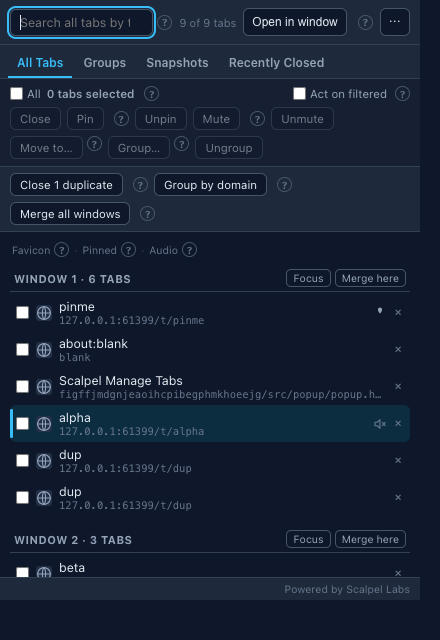
Scalpel Manage Tabs puts every open tab, across every window, in one searchable list. Search by title or URL, close duplicates in a click, bulk-close, pin, mute, move, or group the tabs you tick, build Chrome tab groups, merge all your windows into one, and save whole sessions as snapshots you can export and restore. A full window view opens with Alt+Shift+M so the manager stays put while you sort tabs across windows. It runs on your device, with no account and no network requests.
A closer look
What it does
- Search every open tabType part of a title or URL and filter every tab across every window at once. The match is live and not case sensitive, so a word in the address finds a page even when its title doesn't.
- Close duplicates safelyFind tabs pointing at the same page and close the extras in one click, keeping one copy per address. A pinned tab is always the one kept. You choose whether trailing slashes, #fragments, www., and query strings count toward two tabs being the same page.
- Bulk actions in one stepTick several tabs, then close, pin, mute, move to another window, or group them all at once instead of dealing with each tab on its own.
- Tab groupsBuild a Chrome tab group from a selection, then rename it, set one of nine colours, or collapse it. Ungroup to scatter the tabs back to the strip.
- Merge windows, keep groupsPull every tab from every open window into one. Tab groups move across as whole units, so grouped tabs stay together after the merge.
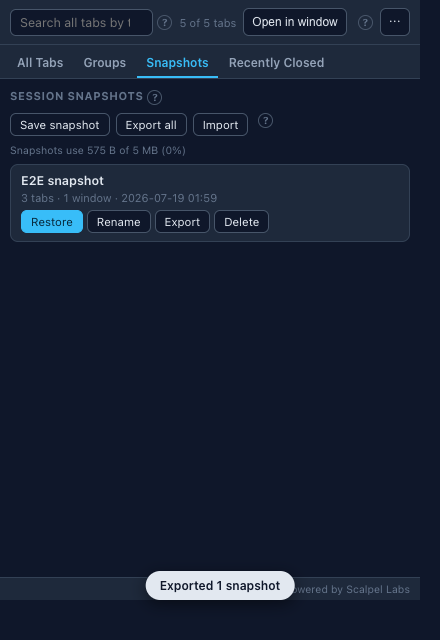
- Snapshots, export, and recently closedSave the current set of windows and tabs as a snapshot, then restore it later. Export snapshots as a plain JSON file you own and import them on another machine, and reopen tabs and windows you just closed from Chrome's own history. A right-click menu and a ? on each concept round it out.
Permissions, explained
Chrome shows these permissions when you install the extension. Here's what each one is for and why it's the least this tool needs.
This extension requests no access to all sites. It can only read a page after you click its icon there.
tabsReads the open tabs across all windows, their titles, URLs, and pinned, audio, and group state, so it can search, dedupe, and act on them. It reads no browsing history beyond the open tabs.tabGroupsCreates, renames, recolours, and collapses Chrome tab groups when you group a selection.storageKeeps your session snapshots and settings in local storage on your device. Nothing is synced to a cloud account.sessionsReads recently closed tabs and windows from Chrome's own history so you can reopen them. It never modifies that list.contextMenusAdds the extension's own right-click items for the common actions. It only adds menu items and reads no page.
Frequently asked questions
Where do my session snapshots get stored?
In local storage on your device (chrome.storage.local). There's no sync server and no account, so your tab titles and URLs never leave your machine. You can export a snapshot as a JSON file and import it on another machine yourself.
Will it close a tab I'm relying on when I dedupe?
No. Closing duplicates keeps one copy per address, and a pinned tab is always the copy it keeps. You control whether trailing slashes, fragments, www., and query strings count toward two tabs being the same page.
How is it different from Scalpel Tab Suspender?
Tab Suspender frees memory by discarding inactive tabs. Manage Tabs is about finding and organising tabs: search, duplicate cleanup, groups, window merge, and session snapshots. They solve different problems and work well together.
Does it need access to the sites I visit?
No. It requests no host permissions and injects no content scripts. It reads the tab list, titles, and URLs from Chrome's tab APIs, not the content of your pages.
Is it free?
Yes. Scalpel Manage Tabs is free, with no account. The only extras are a Powered by Scalpel Labs footer link and an optional Donate button in settings; nothing is gated.
Learn the concepts
Plain-language definitions of the SEO, analytics, and web terms behind this tool.
- Bulk Tab Actions: Change Many Tabs at Once
- Chrome Tab Groups: Create, Rename and Colour Them
- Export and Import Tab Snapshots as JSON
- How to Move Tabs Between Windows
- How to Search All Your Open Tabs at Once
- Merge All Browser Windows Into One
- Recently Closed Tabs and How to Reopen Them
- Selection Scope Versus Filter Scope
- Tab Audio Indicators: Sound and Mute Icons
- Tab Session Snapshots: Save and Restore Your Tabs
- The Full Window View Versus the Toolbar Popup
- The Nine Chrome Tab Group Colours
More Scalpel extensions
 Scalpel SEO On-page SEO audit and inspector.
 Scalpel Tags Analytics tag debugger.
 Scalpel Stack Technology detector.
 Scalpel Redirects Redirect chain inspector.
 Scalpel Tab Suspender Tab suspender and memory saver.
 Scalpel Tables Table extractor.
 Scalpel Links Link extractor.
 Scalpel Images Image extractor.
 Scalpel Color Color toolkit.
 Scalpel Ads Blocker Ad and tracker blocker.