
Scalpel Tab Suspender
Scalpel Tab Suspender: tab suspender and memory saver
Runs entirely in your browser. No tracking, no accounts, and nothing is sent to a server.
Coming to the Chrome Web Store
Scalpel Tab Suspender suspends inactive tabs to free memory and CPU using Chrome's native discard. Tabs reload in place when you return to them, with no placeholder pages and no data loss.
A closer look
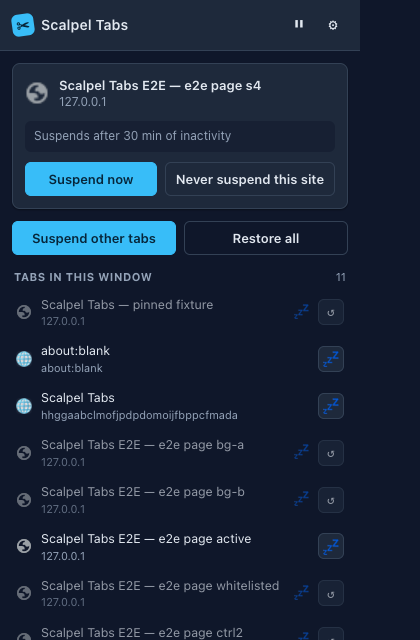
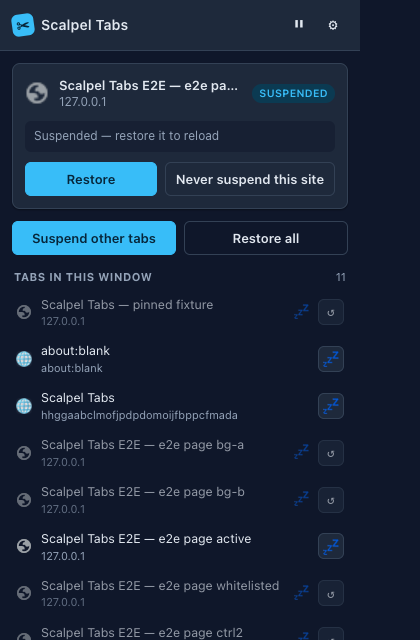
What it does
- Automatic suspensionSuspends tabs after a configurable idle time, 30 minutes by default, freeing both memory and CPU until you return to them.
- Native discard, no data lossUses Chrome's native discard, so tabs keep their real URL, title, and favicon and reload in place. Nothing is orphaned if the extension is removed.
- What it never suspendsNever suspends the active tab, pinned tabs, tabs playing audio, tabs with unsaved form input, or sites you whitelist.
- Popup, stats, and shortcutsSee the active tab's countdown and any exclusion reason, suspend now, pause all suspension, or restore every suspended tab in the window. A stats panel shows freed memory, the session total, the protected breakdown, and your top freed sites. Alt+S suspends the current tab, Alt+Shift+S suspends every other one, and a right-click menu covers the same actions.
- Whitelisting, import, and exportAdd any domain to the never-suspend list from the popup, import or export that list as plain text, and see an estimate of the memory freed plus a badge count of suspended tabs.
- Private and MV3-nativeNo analytics, no remote code, and no network requests of any kind. Built for Manifest V3 service-worker lifetimes from the start, with a ? on each concept linking to the glossary.
Permissions, explained
Chrome shows these permissions when you install the extension. Here's what each one is for and why it's the least this tool needs.
This extension requests no access to all sites. It can only read a page after you click its icon there.
tabsReads each tab's URL, title, and pinned, audible, active, and discarded state for the suspension logic.storageStores your settings and runtime state, such as last-active timestamps. No browsing history or personal data is stored.alarmsTriggers the periodic suspension sweep using Chrome's alarm API.faviconShows tab favicons in the popup through Chrome's on-device favicon API, not an external image request.contextMenusAdds right-click items to suspend this tab, suspend the others, or never suspend the site. It only adds menu items and reads no page.
Frequently asked questions
Will I lose my tabs or their content?
No. Scalpel Tab Suspender uses Chrome's native discard, so a suspended tab keeps its real URL, title, and favicon and reloads in place when you return. If the extension is removed, nothing is orphaned.
Which tabs are never suspended?
The active tab, pinned tabs, tabs playing audio, tabs with unsaved form input, and any site you add to the whitelist.
Does it track my browsing?
No. It makes no network requests, includes no analytics or remote code, and keeps settings and state on your device.
How does it decide when to suspend a tab?
A tab is suspended after a configurable idle time, 30 minutes by default. A minute-by-minute alarm runs the sweep, and you can pause it or suspend and restore tabs manually.
Is it free?
Yes. Scalpel Tab Suspender is free, with no account.
Learn the concepts
Plain-language definitions of the SEO, analytics, and web terms behind this tool.
- Audible Tabs: Why Playing Sound Blocks Suspension
- How Much Memory Does Suspending a Tab Save?
- How to Suspend a Tab Right Now
- Import and Export Your Never-Suspend List
- Keyboard Shortcuts for Suspending Tabs
- Native Tab Discard: Why It Beats a Placeholder Page
- Never Suspend a Site: Protect One Domain
- Never-Suspend Patterns: Hostnames and Paths, No Regex
- Pausing Tab Suspension: A Temporary Off Switch
- Pinned Tabs and Why Scalpel Leaves Them Alone
- Reading Your Suspended-Tab Statistics
- Restore Suspended Tabs Without Losing Your Place
More Scalpel extensions
 Scalpel SEO On-page SEO audit and inspector.
 Scalpel Tags Analytics tag debugger.
 Scalpel Stack Technology detector.
 Scalpel Redirects Redirect chain inspector.
 Scalpel Tables Table extractor.
 Scalpel Links Link extractor.
 Scalpel Images Image extractor.
 Scalpel Color Color toolkit.
 Scalpel Manage Tabs Tab search, cleanup, and sessions.
 Scalpel Ads Blocker Ad and tracker blocker.