
Scalpel Color
Scalpel Color: eyedropper and color toolkit
Runs entirely in your browser. No tracking, no accounts, and nothing is sent to a server.
Coming to the Chrome Web Store
Scalpel Color is a set of six color tools: a native eyedropper, page palette extraction, CSS color harvest, a gradient generator, a WCAG contrast checker, and a local history. Everything stays on your device.
A closer look
What it does
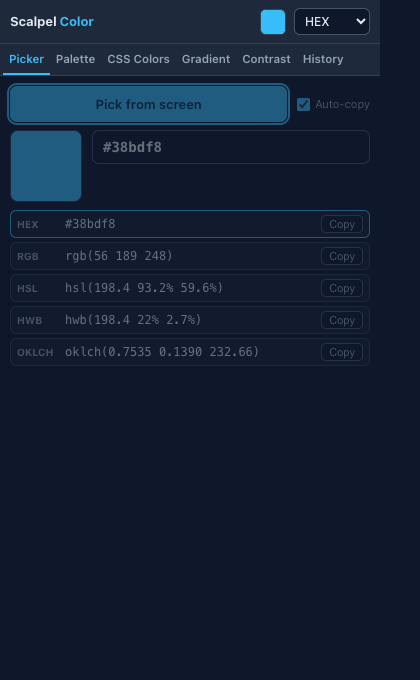
- Native eyedropperPick any pixel on screen with the native EyeDropper API and a built-in magnifier, over images, video, canvas, or outside the browser window, with optional auto-copy.
- Page palette, saved and exportedScan the visible page and pull a dominant-color palette of 4 to 16 colors using dependency-free median-cut quantisation. Save palettes locally and export one as CSS custom properties, a Tailwind color config, or JSON design tokens.
- CSS color harvestExtract every color from computed styles, grouped by frequency with element locators, filterable, and exportable to JSON or CSV.
- Gradient generatorBuild linear, radial, or conic gradients with 2 to 10 stops and a live preview, then copy the CSS.
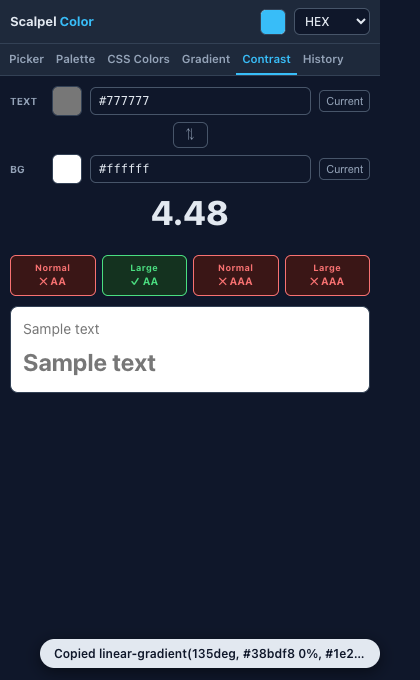
- WCAG contrast, pair or matrixCheck the contrast ratio between two colors with AA and AAA verdicts for normal and large text, including semi-transparent compositing. Flip on the matrix to score every color in a palette against every other, so unsafe pairs show at a glance.
- Modern formats, history, and helpRead and copy hex, rgb, hsl, hwb, and oklch per CSS Color 4, and keep a local history you can pin and name that survives a browser restart. Preview a palette through color-blindness simulations, reach the tools from a right-click menu, and open a ? on any concept for the glossary.
Permissions, explained
Chrome shows these permissions when you install the extension. Here's what each one is for and why it's the least this tool needs.
This extension requests no access to all sites. It can only read a page after you click its icon there.
activeTabReads the active tab to screenshot it for palette extraction and to inject the color-harvest script.scriptingInjects the CSS color-harvest script.storageStores your color history, saved palettes, and preferences locally.clipboardWriteCopies color strings when you click a copy button.contextMenusAdds right-click items to pick a color from the page or harvest its palette. It only adds menu items.
Frequently asked questions
What can the eyedropper pick from?
The native EyeDropper API picks any pixel on screen, including over images, video, and canvas, and even outside the browser window, with a built-in magnifier and optional auto-copy.
Which color formats does it support?
Hex, rgb, hsl, hwb, and oklch, serialised per CSS Color 4 with OKLab precision.
Does it store my colors anywhere online?
No. Your history and saved palettes stay on your device. The extension makes no network requests and has no host permissions.
Can it check accessibility contrast?
Yes. The contrast checker reports the ratio between two colors with AA and AAA verdicts for normal and large text, and it can composite a semi-transparent foreground over a background.
Is it free?
Yes. Scalpel Color is free, with no account.
Learn the concepts
Plain-language definitions of the SEO, analytics, and web terms behind this tool.
- Adding Custom Colors to tailwind.config.js
- Alpha Compositing - Why Transparent Text Contrast Is Tricky
- Colour Blindness Simulation - See Your Palette as Others Do
- Colour Contrast Matrix - Check Every Pair at Once
- Colour Design Tokens - One Palette, Every Platform
- Colour History - Reuse Every Colour You Pick, Privately
- Colour Palette Extraction - Lift a Palette From Any Page
- CSS Color Audit: Find Every Color a Page Uses
- CSS Color Formats: hex, rgb, hsl, hwb and oklch
- CSS Custom Properties (Variables) for Color
- CSS Gradients: Linear, Radial and Conic
- CSS Named Colors: All 148 Keywords (plus transparent)
More Scalpel extensions
 Scalpel SEO On-page SEO audit and inspector.
 Scalpel Tags Analytics tag debugger.
 Scalpel Stack Technology detector.
 Scalpel Redirects Redirect chain inspector.
 Scalpel Tab Suspender Tab suspender and memory saver.
 Scalpel Tables Table extractor.
 Scalpel Links Link extractor.
 Scalpel Images Image extractor.
 Scalpel Manage Tabs Tab search, cleanup, and sessions.
 Scalpel Ads Blocker Ad and tracker blocker.